Introduction to end-to-end analytics using Microsoft Fabric

Mohamad's interest is in Programming (Mobile, Web, Database and Machine Learning). He is studying at the Center For Artificial Intelligence Technology (CAIT), Universiti Kebangsaan Malaysia (UKM).
Discover how Microsoft Fabric can meet your enterprise's analytics needs in one platform. Learn about Microsoft Fabric, how it works, and identify how you can use it for your analytics needs.
Learning objectives
In this module, you learn how to:
Identify the capabilities of Microsoft Fabric.
Implement Microsoft Fabric to meet your enterprise's analytics needs.
[1] Introduction
Microsoft Fabric is an end-to-end analytics platform that provides a single, integrated environment for data professionals and the business to collaborate on data projects. Fabric provides a set of integrated services that enable you to ingest, store, process, and analyze data in a single environment.
Microsoft Fabric provides tools for both citizen and professional data practitioners, and integrates with tools the business needs to make decisions. Fabric includes the following services:
Data engineering
Data integration
Data warehousing
Real-time intelligence
Data science
Business intelligence
Additionally, Microsoft Fabric integrates Copilot, a generative AI assistant that enhances productivity across all workloads by providing intelligent code completion, natural language to SQL conversion, automated insights, and contextual assistance for data professionals and business users alike.
This module introduces the Fabric platform, discusses who Fabric is for, explores Fabric services, and examines how Copilot enhances the analytics experience.
[2] Explore end-to-end analytics with Microsoft Fabric
Scalable analytics can be complex, fragmented, and expensive. Microsoft Fabric simplifies analytics solutions by providing a single, easy-to-use product that integrates various tools and services into one platform.
Fabric is a unified software-as-a-service (SaaS) platform where all data is stored in a single open format in OneLake. OneLake is accessible by all analytics engines in the platform, ensuring scalability, cost-effectiveness, and accessibility from anywhere with an internet connection.
OneLake
OneLake is Fabric's centralized data storage architecture that enables collaboration by eliminating the need to move or copy data between systems. OneLake unifies your data across regions and clouds into a single logical lake without moving or duplicating data.
OneLake is built on Azure Data Lake Storage (ADLS) and supports various formats, including Delta, Parquet, CSV, and JSON. All compute engines in Fabric automatically store their data in OneLake, making it directly accessible without the need for movement or duplication. For tabular data, the analytical engines in Fabric write data in delta-parquet format and all engines interact with the format seamlessly.
Shortcuts are references to files or storage locations external to OneLake, allowing you to access existing cloud data without copying it. Shortcuts ensure data consistency and enable Fabric to stay in sync with the source.

Workspaces
In Microsoft Fabric, workspaces serve as logical containers that help you organize and manage your data, reports, and other assets. They provide a clear separation of resources, making it easier to control access and maintain security.
Each workspace has its own set of permissions, ensuring that only authorized users can view or modify its contents. This structure supports team collaboration while maintaining strict access control for both business and IT users.
Workspaces allow you to manage compute resources and integrate with Git for version control. You can optimize performance and cost by configuring compute settings, while Git integration helps track changes, collaborate on code, and maintain a history of your work.
Administration and governance
Fabric's OneLake is centrally governed and open for collaboration. Data is secured and governed in one place, which allows users to easily find and access the data they need. Fabric administration is centralized in the Admin portal.
In the admin portal you can manage groups and permissions, configure data sources and gateways, and monitor usage and performance. You can also access the Fabric admin APIs and SDKs in the admin portal, which can automate common tasks and integrate Fabric with other systems.
The OneLake catalog helps you analyze, monitor, and maintain data governance. It provides guidance on sensitivity labels, item metadata, and data refresh status, offering insights into the governance status and actions for improvement.
Note
Review the Microsoft Fabric administration documentation for more information.
[3] Explore data teams and Microsoft Fabric
Microsoft Fabric's unified data analytics platform makes it easier for data professionals to collaborate on projects. Fabric increases collaboration between data professionals by removing data silos and the need for multiple systems.
Traditional roles and challenges
In a traditional analytics development process, data teams often face several challenges due to the division of data tasks and workflows.
Data engineers process and curate data for analysts, who then use it to create business reports. This process requires extensive coordination, often leading to delays and misinterpretations.
Data analysts often need to perform downstream data transformations before creating Power BI reports. This process is time-consuming and can lack the necessary context, making it harder for analysts to connect directly with the data.
Data scientists face difficulties integrating native data science techniques with existing systems, which are often complex, and makes it challenging to efficiently provide data-driven insights.
Evolution of collaborative workflows
Microsoft Fabric simplifies the analytics development process by unifying tools into a SaaS platform. Fabric allows different roles to collaborate effectively without duplicating efforts.
Data engineers can ingest, transform, and load data directly into OneLake using Pipelines, which automate workflows and support scheduling. They can store data in lakehouses, using the Delta-Parquet format for efficient storage and versioning. Notebooks provide advanced scripting capabilities for complex transformations.
Analytics engineers bridge the gap between data engineering and analysis by curating data assets in lakehouses, ensuring data quality, and enabling self-service analytics. They can create semantic models in Power BI to organize and present data effectively.
Data analysts can transform data upstream using dataflows and connect directly to OneLake with Direct Lake mode, reducing the need for downstream transformations. They can create interactive reports more efficiently using Power BI.
Data scientists can use integrated notebooks with support for Python and Spark to build and test machine learning models. They can store and access data in lakehouses and integrate with Azure Machine Learning to operationalize and deploy models.
Low-to-no-code users and citizen developers can discover curated datasets through the OneLake catalog and use Power BI templates to quickly create reports and dashboards. They can also use dataflows to perform simple ETL tasks without relying on data engineers.
[4] Enable and use Microsoft Fabric
Before you can explore the end-to-end capabilities of Microsoft Fabric, it must be enabled for your organization. You might need to work with your IT department to enable Fabric for your organization, including one of the following roles:
Fabric admin (formerly Power BI admin): Manages Fabric settings and configurations.
Power Platform admin: Oversees Power Platform services, including Fabric.
Microsoft 365 admin: Manages organization-wide Microsoft services, including Fabric.
Enable Microsoft Fabric
Admins can enable Fabric in the Admin portal > Tenant settings in the Power BI service. Fabric can be enabled for the entire organization or for specific Microsoft 365 or Microsoft Entra security groups. Admins can also delegate this ability to other users at the capacity level.
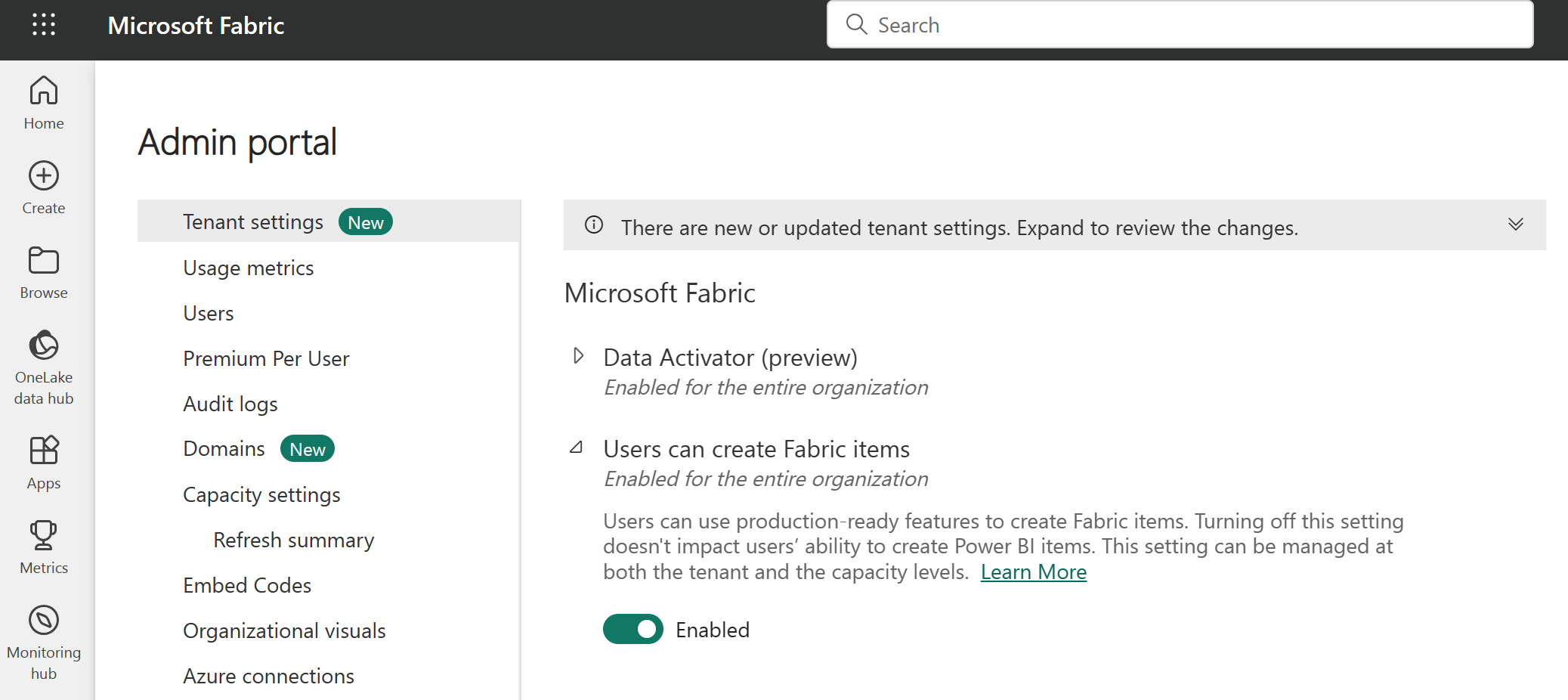
Note
If your organization isn't using Fabric or Power BI today, you can sign up for a free Fabric trial to explore its features.
Create workspaces
Workspaces are collaborative environments where you can create and manage items like lakehouses, warehouses, and reports. All data is stored in OneLake and accessed through workspaces. Workspaces also support data lineage view, providing a visual view of data flow and dependencies to enhance transparency and decision-making.
In Workspace settings, you can configure:
License type to use Fabric features.
OneDrive access for the workspace.
Azure Data Lake Gen2 Storage connection.
Git integration for version control.
Spark workload settings for performance optimization.
You can manage workspace access through four roles: admin, contributor, member, and viewer. These roles apply to all items in a workspace and should be reserved for collaboration. For more granular access control, use item-level permissions based on business needs.
Note
Learn more about workspaces in the Fabric documentation.
Discover data with OneLake catalog
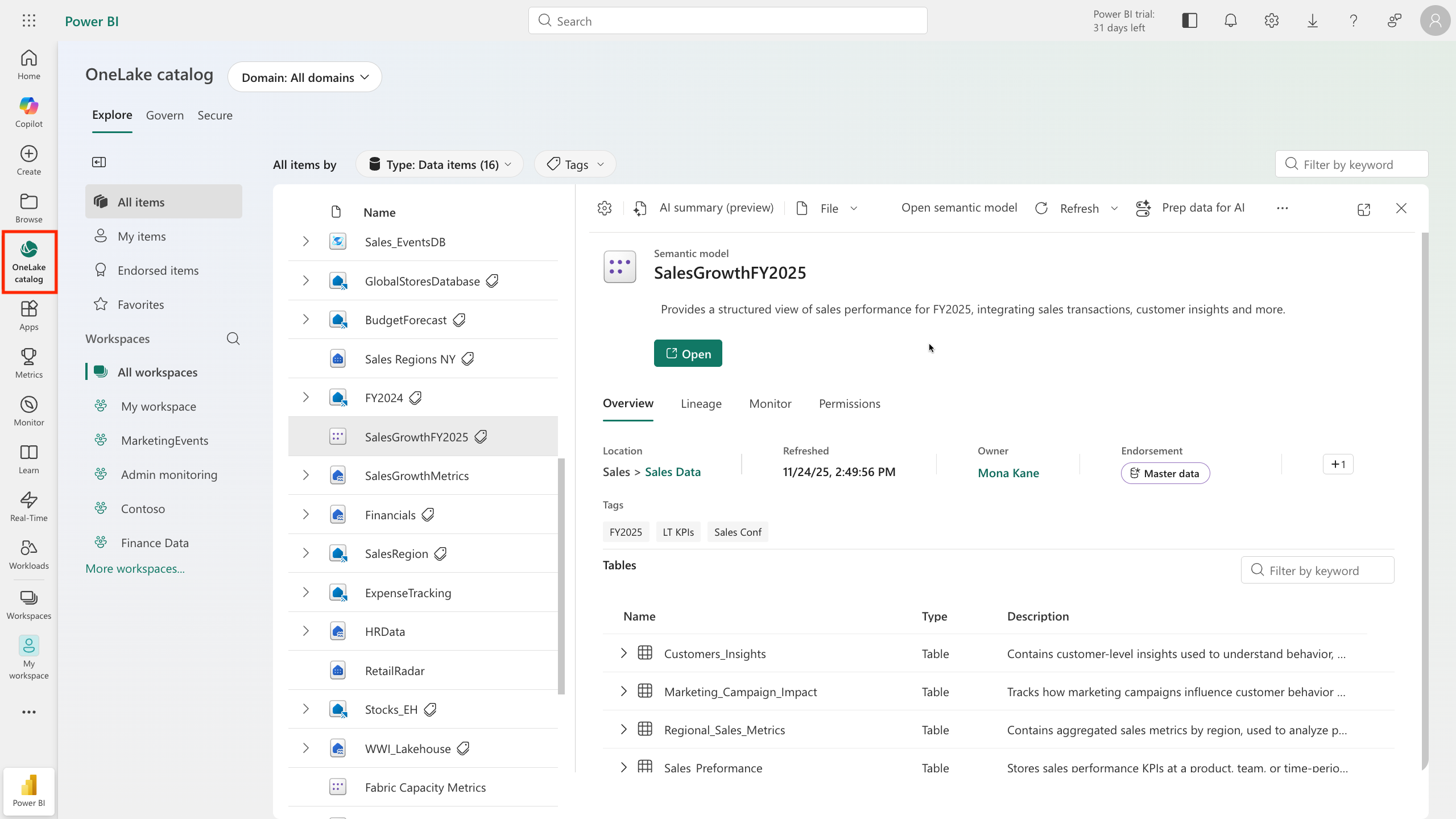
The OneLake catalog in Microsoft Fabric helps users easily find and access various data sources within their organization. Users explore and connect to data sources, ensuring they have the right data for their needs. Users only see items shared with them. Here are some considerations when using OneLake catalog:
Narrow results by workspaces or domains (if implemented).
Explore default categories to quickly locate relevant data.
Filter by keyword or item type.
Create items with Fabric workloads
After you create your Fabric enabled workspace, you can start creating items in Fabric. Each workload in Fabric offers different item types for storing, processing, and analyzing data. Fabric workloads include:
Data Engineering: Create lakehouses and operationalize workflows to build, transform, and share your data estate.
Data Factory: Ingest, transform, and orchestrate data.
Data Science: Detect trends, identify outliers, and predict values using machine learning.
Data Warehouse: Combine multiple sources in a traditional warehouse for analytics.
Databases: Create and manage databases with tools to insert, query, and extract data.
Industry Solutions: Use out-of-the-box industry data solutions.
Real-Time Intelligence: Process, monitor, and analyze streaming data.
Power BI: Create reports and dashboards to make data-driven decisions.
Fabric integrates capabilities from existing Microsoft tools like Power BI, Azure Synapse Analytics, and Azure Data Factory into a unified platform. Fabric also supports a data mesh architecture, allowing decentralized data ownership while maintaining centralized governance. This design eliminates the need for direct Azure resource access, simplifying data workflows.
Enhance productivity with Copilot in Fabric
Microsoft Copilot in Fabric is a generative AI assistant that enhances productivity and accelerates insights across all Fabric workloads. Copilot uses large language models (LLMs) to provide intelligent assistance for data professionals, self-service users, and business users.
Copilot capabilities across workloads
Copilot provides tailored assistance for each Fabric workload:
Data Engineering and Data Science: Intelligent code completion, automated routine tasks, industry-standard code templates, and contextual code suggestions that adapt to specific tasks. Copilot helps with data preparation, pipeline building, and insight generation.
Data Factory: AI-enhanced toolset supporting both citizen and professional data wranglers with intelligent code generation for data transformation and code explanations for complex tasks.
Data Warehouse and SQL Database: Natural language to SQL conversion, code completion, quick actions, and intelligent insights. Users can describe what they want in plain language, and Copilot generates the appropriate SQL queries.
Power BI: Automatic report generation, summary creation for report pages, synonym generation for better Q&A capabilities, and natural language querying of data. Business users can also use Copilot to extract more insights and chat with the report data.
Real-Time Intelligence: Advanced AI tool that translates natural language questions into Kusto Query Language (KQL) queries, streamlining data analysis for both experienced users and citizen data scientists.
Enabling Copilot
Administrators must enable Copilot in the Admin portal > Tenant settings in the Power BI service.
Copilot helps users work more efficiently by providing AI assistance for common tasks like writing code, generating queries, and creating reports. This support is available to both technical and business users while maintaining organizational security policies.
Tip
For more information, see the Copilot for Microsoft Fabric and Power BI documentation.
[5] Module assessment
[1] What is a key benefit of using Microsoft Fabric in data projects?
a. It allows data professionals to work independently, without collaboration.
b. It requires duplicating data across systems to ensure availability.
c. It provides a single, integrated environment for collaboration on data projects.
[2] What is the default storage format for Fabric's OneLake?
a. Delta-Parquet
b. JSON
c. CSV
[3] Which Fabric experience is used to move and transform data?
a. Data Science
b. Data Warehousing
c. Data Factory
[6] Summary
Data professionals are increasingly expected to be able to work with data at scale, and to be able to do so in a way that is secure, compliant, and cost-effective. At the same time, the business wants to use that data more effectively and quickly to make better decisions.
Microsoft Fabric is a collection of tools and services that enables organizations to do just that. In this module, you learned about Fabric's OneLake storage, the workloads that are included in Fabric, how to enable and use Fabric in your organization, and how Copilot enhances productivity across all Fabric workloads with intelligent AI assistance.
Source:
https://learn.microsoft.com/en-us/training/modules/introduction-end-analytics-use-microsoft-fabric/