Orange Data Mining: Install the Textable Add-On

Mohamad's interest is in Programming (Mobile, Web, Database and Machine Learning). He is studying at the Center For Artificial Intelligence Technology (CAIT), Universiti Kebangsaan Malaysia (UKM).
The Orange Data Mining Textable Add-On is a component of the Orange data mining software that enhances its text mining capabilities. It enables users to preprocess text data through tokenization, stemming, and stop word removal, and facilitates the creation of document-term matrices essential for analysis. The add-on supports text classification and provides visualization tools, such as word clouds, for exploring text data
Orange Textable offers the following features:
text data import from keyboard, files, or urls
support for various encodings, including Unicode
standard preprocessing and custom recoding (based on regular expressions)
segmentation and annotation of various text units (letters, words, etc.)
ability to extract and exploit XML-encoded annotations
automatic, random, or arbitrary selection of unit subsets
unit context examination using concordance and collocation tables
calculation of frequency and complexity measures
recoded text data and table export
[1] Getting Started
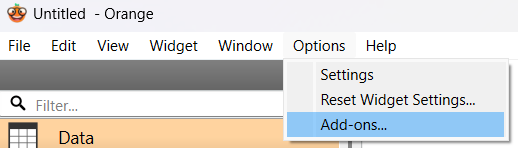
Install the add-on via the Orange Canvas.
Select Textable Add-on.
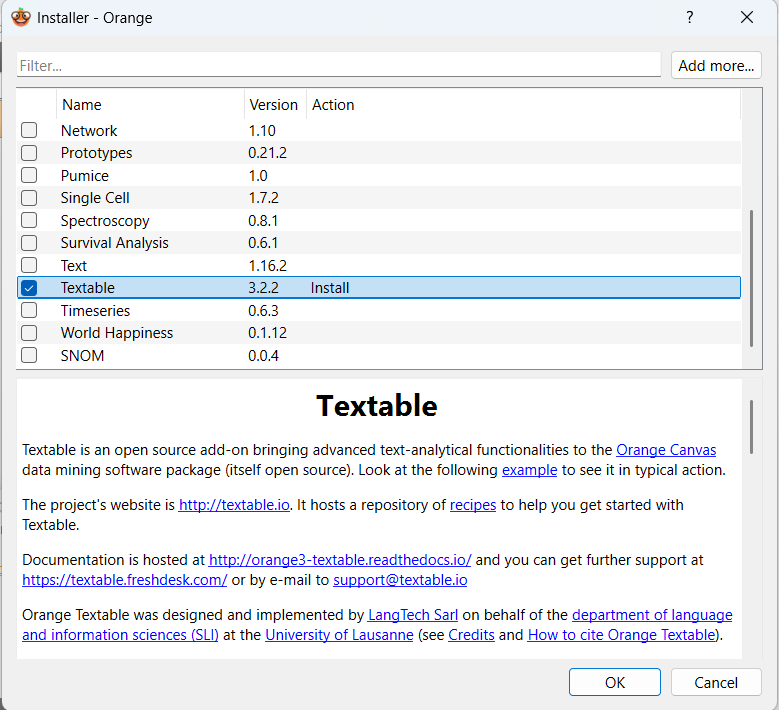
Wait for the installation to complete.
You may need to restart the application.
Textable Add-On now appears in the left-hand panel.
