Switching Concepts and MAC Addressing [Interactive Simulation]
Mohamad's interest is in Programming (Mobile, Web, Database and Machine Learning). He is studying at the Center For Artificial Intelligence Technology (CAIT), Universiti Kebangsaan Malaysia (UKM).
This article introduces core switching concepts using a Switch Lab Simulator that visually demonstrates how frames move, how MAC addresses are learned, and why certain network problems occur.
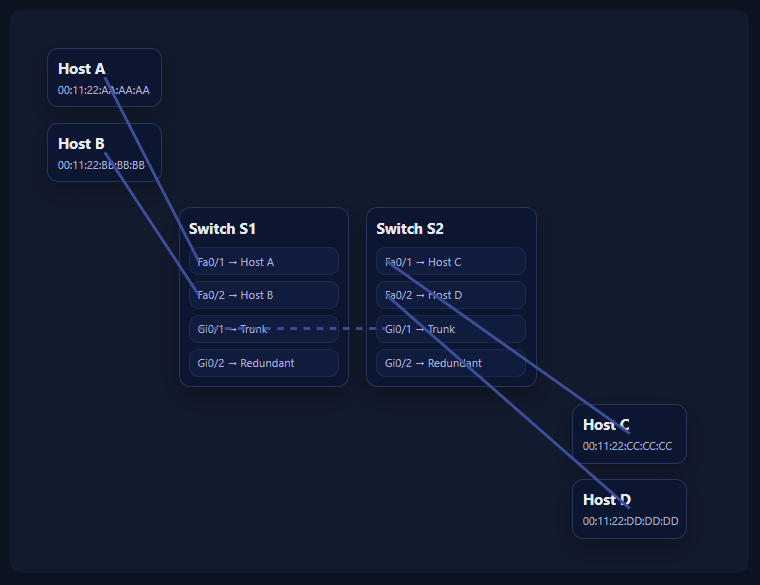
A network switch is a device designed to connect multiple devices within the same local network and forward data efficiently between them. Unlike hubs, which blindly repeat traffic, switches make intelligent forwarding decisions.
A traditional Ethernet switch operates at Layer 2 (Data Link Layer) of the OSI model. At this layer:
Devices are identified by MAC addresses
Data is transmitted in Ethernet frames
Forwarding decisions are based on MAC address tables, not IP addresses
Because switches work at Layer 2, they are unaware of concepts such as IP routing, subnets, or default gateways. Their only job is to learn where devices are located and deliver frames to the correct port.
[1] Key Switching Concepts Covered in This Article
[1.1] Ethernet Switching Operation
Ethernet switching refers to how a switch receives an Ethernet frame on one port and decides where to forward it. The decision is made by examining the destination MAC address and comparing it against the switch’s MAC address table.
If the destination is known, the frame is forwarded to a single port. If not, flooding occurs.
[1.2] MAC Address Table Learning
A switch builds its MAC address table dynamically.
The switch learns only from the source MAC address
Learning happens on the ingress port
Each entry has an aging timer and will be removed if inactive
For example, when Host A sends any frame, the switch records:
00:11:22:AA:AA:AA → Fa0/1
This learning process is fundamental to all switching behavior.
[1.3] Unknown Unicast Flooding
When a switch receives a unicast frame but does not know the destination MAC, it cannot forward intelligently.
Instead, it:
Floods the frame out all ports except the ingress port
Includes access ports and trunk ports
This behavior ensures the frame eventually reaches the destination, even if it is inefficient.
[1.4] Broadcast Forwarding
Broadcast frames use the destination MAC:
FF:FF:FF:FF:FF:FF
Broadcasts are sent to all devices in the same broadcast domain. Switches always flood broadcast frames out all ports except the one they arrived on.
Common broadcast use cases include:
ARP requests
DHCP discovery
[1.5] ARP Request / Reply Behavior
ARP (Address Resolution Protocol) is how a host discovers the MAC address of another host on the same network.
Typical flow:
Host A sends a broadcast ARP request
Switch floods the request
Host B responds with a unicast ARP reply
Switch forwards the reply using its MAC table
This exchange explains why unicast forwarding becomes efficient after an initial broadcast.
[1.6] Inter-Switch Trunk Behavior
A trunk link connects switches and carries traffic between them.
Important properties:
Flooded frames traverse trunk links
Broadcasts propagate across trunks
MAC learning occurs independently on each switch
Trunks allow networks to scale, but they also amplify flooding and broadcast traffic.
[1.7] Switching Loops
When multiple paths exist between switches, Layer 2 loops can form.
Unlike routers, switches do not decrement TTL or track frame history. As a result:
Frames can circulate indefinitely
MAC tables become unstable
Network performance collapses
Loops are especially dangerous with broadcast traffic.
[1.8] Broadcast Storms
A broadcast storm occurs when broadcast frames:
Loop endlessly
Multiply exponentially
Consume all available bandwidth
Broadcast storms can bring an entire LAN down within seconds.
[1.9] Spanning Tree Protocol (Conceptual)
Spanning Tree Protocol (STP) prevents Layer 2 loops by:
Detecting redundant paths
Blocking selected ports
Allowing only one active forwarding path
STP ensures loop-free topologies while still allowing redundancy for fault tolerance.
[2] How to Use the Switch Lab Simulator
The simulator is designed to let you observe these behaviors step by step.
Step 1: Choose Frame Type
Unicast: Frame sent to a specific destination MAC
Broadcast: Frame sent to all devices
Broadcast mode removes the destination host selection, because broadcasts have no single target.

Step 2: Select Source Host
Choose which host sends the frame (A, B, C, or D).
The switch will learn the source MAC address on the ingress port every time.
Step 3: Select Destination (Unicast Only)
For unicast frames, select the destination host.
If the MAC is unknown, flooding will occur.
If the MAC is known, the switch forwards to a single port.
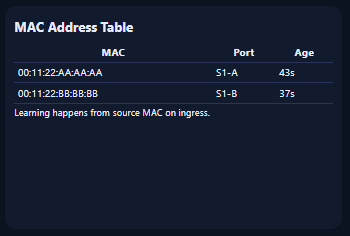
Step 4: Observe the MAC Address Table
Watch how entries appear and age out:
MAC address
Associated port
Remaining age
This table explains every forwarding decision the switch makes.
Step 5: Read the Event Log
The event log explains:
Why flooding occurred
When learning happens
Why frames are forwarded or blocked
When loops or storms are detected
Example:
Event Log
Unicast known: destination MAC 00:11:22:AA:AA:AA (Host A) found → forward out port S1-A.
B sends UNICAST to Host A. L2 src=00:11:22:BB:BB:BB, dst=00:11:22:AA:AA:AA. Switch learns source MAC 00:11:22:BB:BB:BB on ingress port S1-B.
Unicast unknown: destination MAC 00:11:22:BB:BB:BB (Host B) not in MAC table → flood out all ports except ingress.
A sends UNICAST to Host B. L2 src=00:11:22:AA:AA:AA, dst=00:11:22:BB:BB:BB. Switch learns source MAC 00:11:22:AA:AA:AA on ingress port S1-A.
Broadcast forwarding: flood out all ports except ingress (within this demo).
A sends BROADCAST (ARP Request). L2 dst = FF:FF:FF:FF:FF:FF. Switch learns source MAC 00:11:22:AA:AA:AA on ingress port S1-A.
This log mirrors how a network engineer reasons about switch behavior.
Step 6: Experiment with Redundancy and STP
Add redundant inter-switch link: creates a loop
Enable STP: blocks the redundant path
Auto-storm: visualizes broadcast storms when loops exist
These options demonstrate why STP is mandatory in real networks.
Closing Thoughts
Understanding switching is about understanding frame flow.
By visualizing MAC learning, flooding, broadcasts, and loops, the Switch Lab Simulator bridges the gap between theory and real network behavior. Everything you observe aligns directly with how Ethernet switches operate in production networks.
This foundation is essential for anyone designing or troubleshooting real LANs.