Understanding Cloud Computing Using Replit.com
Mohamad's interest is in Programming (Mobile, Web, Database and Machine Learning). He is studying at the Center For Artificial Intelligence Technology (CAIT), Universiti Kebangsaan Malaysia (UKM).
A simple, hands-on approach to understanding cloud computing fundamentals — practical for beginners preparing for CompTIA Cloud+, AWS, Azure, or Google Cloud certification exams.
Cloud computing refers to the delivery of computing resources — such as servers, storage, databases, and applications — over the internet, allowing users to access and utilize these services on demand without owning or managing the underlying infrastructure.
One practical way to experience cloud computing in action is through the use of Replit.com, an online development environment that exemplifies the Platform as a Service (PaaS) model. Replit abstracts the complexity of infrastructure management, enabling users to focus solely on writing, executing, and hosting code directly from their web browser.
This tutorial offers a hands-on introduction to cloud computing concepts through the deployment of a PHP-based web application using Replit.com — a browser-based platform that provides compute, storage, and network capabilities with minimal configuration. By using Git to clone an existing project from GitHub, learners gain immediate experience with cloud-hosted version control, file management, and application deployment.
[1] Create a New App
Navigate to https://replit.com and sign in to your account.
Click “Create App”.
Select PHP as the programming language.
Name your project (e.g., project1) and click “Create App”.
This step sets up a virtual development workspace in the cloud. Without needing to install or configure anything locally, users gain access to an isolated container where code can be written and executed — demonstrating the on-demand compute and provisioning capabilities of PaaS cloud platforms.
[2] Run
Click the RUN button.
If the application structure is correct and includes an index.php file, it should launch automatically.
Replit will provide a public web URL where the PHP application can be accessed.
This functionality simulates real-world cloud deployment behavior, where applications are run on remote infrastructure and exposed to the internet without any manual server setup or configuration. This is similar to hosting a web app using services like AWS Elastic Beanstalk, Azure App Service, or Google App Engine.
[3] View the Compute and Storage Resources
Replit provides a virtual runtime environment where your PHP application executes. This environment includes compute resources (CPU, memory) and persistent file storage that automatically saves your project files.
Users can access the Files panel to view and manage their application files — similar to how cloud providers offer object storage (e.g., AWS S3) or block storage (e.g., Azure Disks) alongside compute instances. The seamless integration of compute and storage in Replit demonstrates how these components operate together in cloud systems.
[4] View Networking Service
Once your application is running, Replit assigns a public URL (e.g., https://your-repl-name.repl.co) that can be accessed from any internet browser. This simulates the networking services found in cloud platforms, such as domain name management, secure routing, and load balancing.
Behind the scenes, Replit configures the necessary network infrastructure automatically, allowing developers to deploy and share web applications without dealing with firewalls, DNS, or port configurations.
[5] View Usage
Replit includes a usage view that lets users monitor resource consumption such as CPU, RAM, and storage. Although simplified, this resembles the monitoring tools provided in cloud platforms — like AWS CloudWatch, Azure Monitor, and GCP Cloud Monitoring — which are essential for optimizing performance and controlling costs in production environments.
This visibility into usage helps users understand the importance of resource management and scalability, both of which are foundational to cloud-native application design.
[6] Cloud Concepts Demonstrated
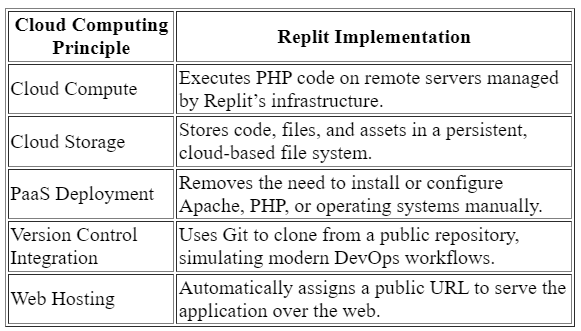
The above matrix clearly connects each action taken in Replit to an underlying cloud computing concept, helping learners see how abstract principles are applied in a real environment.
Based on the simple illustration above, we can delve into more complex cloud computing concepts as shown below.
Important Amazon AWS terms that are commonly used across services
[7] Conclusion
This tutorial offers a practical and accessible introduction to cloud computing by guiding users through the deployment of a PHP web application using Replit. By leveraging a real-world project in a cloud-based environment, learners gain hands-on experience with key concepts such as cloud storage, compute resources, version control, and web hosting. This exercise not only reinforces foundational cloud principles but also provides relevant skills and insights that are directly applicable to certification paths like CompTIA Cloud+, AWS Certified Cloud Practitioner, Microsoft Azure Fundamentals, and Google Cloud Digital Leader. Through this simplified yet meaningful experience, learners are able to bridge the gap between theory and application, developing both conceptual understanding and technical readiness for cloud computing roles.